


Get Ready to Boost your Prepare for your SD-WAN-Engineer Exam with 88 Questions
Use Free SD-WAN-Engineer Exam Questions that Stimulates Actual EXAM
NEW QUESTION # 14
An administrator wants to configure a Path Policy that routes all "Guest Wi-Fi" traffic directly to the internet using the local broadband interface, bypassing all VPN tunnels.
Which Service & DC Group setting should be selected in the policy rule to achieve this "Direct Internet Access" (DIA) behavior?
- A. Standard VPN
- B. Any-Private
- C. Default-Cluster
- D. Direct
Answer: D
Explanation:
Comprehensive and Detailed Explanation
In Prisma SD-WAN Path Policies, the Service & DC Group (Destination) field determines where the traffic is sent.
* Direct: This is the specific keyword/object used to instruct the ION to route traffic directly out to the local WAN interface (Local Breakout) towards the Internet, without encapsulation in a VPN tunnel.
This is the correct setting for Guest Wi-Fi, SaaS applications (like Office 365), or any public web browsing that does not need to be backhauled.
* Standard VPN / Default-Cluster: These options direct traffic into an IPSec overlay tunnel destined for a Data Center or another ION. Selecting these would "backhaul" the guest traffic, which contradicts the requirement for DIA.
When "Direct" is selected, the ION uses its available "Internet" category links. The policy can further specify which internet link to use (e.g., "Use Broadband, avoid LTE") via the path preference list, but the Destination type must be "Direct".
NEW QUESTION # 15
A network engineer is troubleshooting a "Voice Quality" issue. They suspect that the DSCP markings are being stripped or altered by the ISP.
Which tool in the Prisma SD-WAN portal allows the engineer to capture live packets on the WAN interface and inspect the IP header ToS/DSCP field?
- A. Event Logs
- B. Path Quality Monitor
- C. Packet Capture (PCAP)
- D. Flow Browser
Answer: C
Explanation:
Comprehensive and Detailed Explanation
To validate specific packet-level details like DSCP (Differentiated Services Code Point) values, header checksums, or exact payload sizes, a Packet Capture (PCAP) is required.
* PCAP Tool: Prisma SD-WAN provides a built-in PCAP utility accessible directly from the portal. The engineer can select the specific Interface (e.g., Internet 1), apply a Filter (e.g., port 5060 or host
1.2.3.4), and capture the traffic.
* Analysis: The resulting .pcap file can be downloaded and opened in Wireshark. This allows the engineer to definitively see if the packets leaving the ION have DSCP EF (46) and if the packets arriving (if capturing on the other side) still retain that marking, or if the ISP has bleached it to CS0 (0).
* Flow Browser (A): While it shows "Application" and metrics, the Flow Browser typically displays the assigned priority class, not necessarily the raw bit-level DSCP value present in the packet header on the wire.
NEW QUESTION # 16
A network engineer is troubleshooting a user complaint regarding "slow application performance" for an internal web application. While viewing the Flow Browser in the Prisma SD-WAN portal, the engineer notices that the Server Response Time (SRT) is consistently high (over 500ms), while the Network Transfer Time (NTT) and Round Trip Time (RTT) are low (under 50ms).
What does this data indicate about the root cause of the issue?
- A. The issue is likely caused by congestion on the WAN circuit, requiring a QoS policy adjustment.
- B. The issue is due to a misconfigured DNS server at the branch.
- C. The issue is caused by a high packet loss rate on the internet path.
- D. The issue is likely on the application server itself (e.g., high CPU, slow database query), not the network.
Answer: D
Explanation:
Comprehensive and Detailed Explanation
The Flow Browser and App Response Time metrics in Prisma SD-WAN are critical tools for isolating the fault domain-determining whether a problem lies in the "Network" or the "Application." Network Transfer Time (NTT) / Round Trip Time (RTT): These metrics measure the time it takes for packets to traverse the network (WAN/LAN) and for acknowledgments to return. A low NTT (e.g., <50ms) confirms that the network pipes (SD-WAN overlay, Underlay circuits) are healthy and transporting packets quickly.
Server Response Time (SRT): This metric specifically measures the time between the server receiving a request and the server sending the first byte of the response. It essentially measures the "processing time" of the backend server.
In the scenario described, the network metrics (NTT/RTT) are excellent, effectively ruling out WAN congestion, packet loss, or latency (Option A and C). However, the Server Response Time (SRT) is very high (500ms). This signature is a definitive indicator that the network delivered the request instantly, but the application server took a long time to process it. This points the troubleshooting effort toward the server infrastructure (e.g., a slow SQL query, an overloaded web server, or lack of compute resources) rather than the SD-WAN environment.
NEW QUESTION # 17
In a Prisma SD-WAN deployment, what is the defining characteristic of a "Standard VPN" compared to a
"Secure Fabric Link"?
- A. Standard VPNs support BGP, whereas Secure Fabric Links only support static routing.
- B. Standard VPNs are automatically built between ION devices, while Secure Fabric Links require manual configuration.
- C. Standard VPNs are manually configured IPSec tunnels to non-ION endpoints, while Secure Fabric Links are automated tunnels between ION devices.
- D. Standard VPNs use GRE encapsulation, while Secure Fabric Links use VXLAN.
Answer: C
Explanation:
Comprehensive and Detailed Explanation
In the Prisma SD-WAN architecture, the terminology distinguishes between "Native" automation and
"Legacy" interoperability.
* Secure Fabric Links: These are the proprietary, automated overlay tunnels created between two Prisma SD-WAN ION devices (e.g., Branch ION to Data Center ION). The controller automatically manages the IP addressing, key rotation, and routing for these links. You do not manually configure
"Phase 1" or "Phase 2" parameters for Secure Fabric links.
* Standard VPNs: These are traditional, standards-based IPSec tunnels configured to connect an ION device to a Non-ION endpoint (Third-Party Peer). This is used for "Data Center to Data Center" connections where one side is a legacy firewall (e.g., Cisco ASA, Palo Alto Networks NGFW) or for connecting to cloud security services (SSE) that do not have a specific CloudBlade integration. For a Standard VPN, the administrator must manually define the IKE/IPSec profiles, pre-shared keys, and peer IP addresses to match the third-party device's configuration.
NEW QUESTION # 18
A multinational company is deploying Prisma SD-WAN across North America, Europe, and Asia. The data centers in the North America region have served all regions, but regional policies are now being enforced that mandate each of the regions to build their own data centers and branch sites to only connect to their respective regional data centers.
How can this regionalization be achieved so that new or existing branch sites only build tunnels to the regional DC IONs?
- A. Create a new cluster for each regional DC ION and move the sites from the existing cluster to the new cluster.
- B. Assign WAN interfaces to distinct Virtual Routing and Forwarding (VRF) instances for each region on the DC IONs, ensuring that branches only connect to the WAN interfaces/VRFs designated for their region.
- C. Disable the auto-tunnel feature globally on the Prisma SD-WAN portal and manually create all necessary tunnels exclusively between IONs within their designated regions.
- D. Remove the circuit labels and apply new circuit labels for in-region circuits only.
Answer: A
Explanation:
Comprehensive and Detailed Explanation
To achieve strict regional isolation where branch sites only form VPN tunnels with Data Centers in their specific region (e.g., EU branches to EU DCs only), the correct architectural feature to utilize is VPN Clusters
.
In Prisma SD-WAN (CloudGenix), a Cluster defines a logical security and topology boundary for the overlay network. By default, devices may be placed in a "Default" cluster where they attempt to form a mesh or hub- and-spoke topology with all other reachable devices in that context.
To enforce the new policy:
* Logical Partitioning: The administrator should create separate VPN Clusters for each region (e.g.,
"Cluster-NA", "Cluster-EU", "Cluster-Asia").
* Assignment: The Regional Data Center IONs and their corresponding Branch IONs must be moved into their respective clusters.
* Result: The Prisma SD-WAN controller dictates that devices can only establish Secure Fabric (VPN) tunnels with other devices within the same cluster. This effectively segments the global network, ensuring that an Asian branch never attempts to build a tunnel to a North American DC, satisfying the compliance requirement without complex access lists or manual tunnel configuration.
* Option B (Manual Tunnels) is administratively unscalable and negates the benefits of SD-WAN automation.
* Option C (Circuit Labels) is primarily for path selection and traffic steering, not for hard topology segmentation.
* Option D (VRFs) is used for local Layer 3 segmentation (routing isolation) within a device, not for controlling WAN overlay tunnel formation scope.
NEW QUESTION # 19
Based on the HA topology image below, which two statements describe the end-state when power is removed from the ION 1200-S labeled "Active", assuming that the ION labeled "Standby" becomes the active ION?
(Choose two.)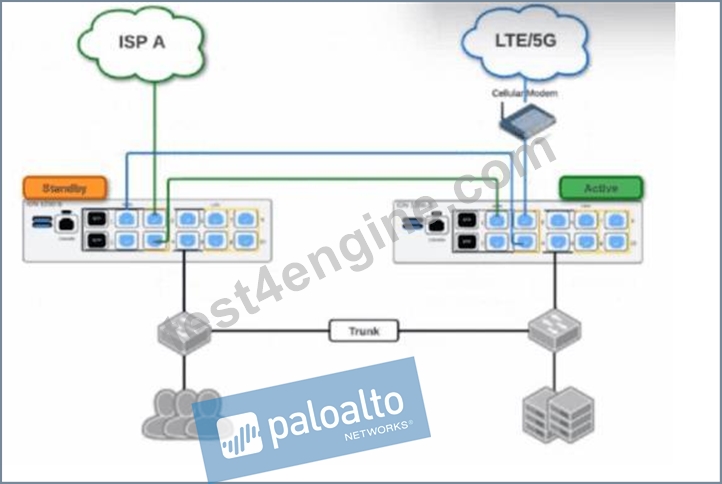
- A. The connection to ISP A will be usable, but the connection to LTE/5G will not.
- B. The VRRP Virtual IP address assigned to any SVIs will be moved to the newly active ION.
- C. Both the connection to ISP A and the connection to LTE/5G will be usable.
- D. The newly active ION will send a gratuitous ARP to the LAN for the IP address of any SVIs.
Answer: C,D
Explanation:
Comprehensive and Detailed Explanation
This scenario depicts a High Availability (HA) topology utilizing the ION 1200-S model's Fail-to-Wire (bypass) capabilities to share WAN links between two devices without needing external switches for every WAN connection.
1. WAN Link Availability (Statement A):
The diagram illustrates a "daisy-chain" cabling method supported by the ION 1200-S bypass pairs.
* ISP A (Green): Connects directly to the "Standby" (Left) unit first. Since the Standby unit remains powered on, it maintains direct access to ISP A.
* LTE/5G (Blue): Connects to the "Active" (Right) unit first. The connection then loops through a bypass pair on the Active unit to the Standby unit. When power is removed from the "Active" unit, the fail-to-wire relays on its Ethernet ports close physically. This creates a passive electrical bridge that connects the LTE modem directly to the Standby unit. The Standby unit (now becoming Active) will detect the link state change and successfully utilize the LTE connection. Therefore, both WAN links remain usable.
2. LAN Failover Mechanism (Statement C):
Prisma SD-WAN ION devices typically use a VRRP-like mechanism for LAN redundancy.
* When the "Active" node fails (loses power), the "Standby" node stops receiving keepalives and promotes itself to the Active state.
* To ensure downstream switches and clients immediately send traffic to the new Active unit, it must update their ARP tables. It does this by broadcasting a Gratuitous ARP (GARP) packet for the Virtual IP (VIP) address of the Switch Virtual Interfaces (SVIs). This action informs the network that the MAC address associated with the Gateway I1P is now reachable via the port connected to the new Active ION.234
NEW QUESTION # 20
When troubleshooting an issue at a site that is running on two cellular links from two carriers, the operations team shared some evidence shown in the graph below:
(SNR Graph showing Carrier-1 in blue dropping to near 0 dB and Carrier-2 in green staying relatively stable between 4.5 dB and 6.5 dB)
For the time duration shown in the graph, what are two inferences about the site's traffic that can be made?
(Choose two.)
- A. Using Carrier-2 as the WAN path may have experienced some performance degradation.
- B. Using Carrier-2 as the WAN path may have switched over to Carrier-1.
- C. Using Carrier-1 as the WAN path may have experienced some performance degradation.
- D. Using Carrier-1 as the WAN path may have switched over to Carrier-2.
Answer: C,D
Explanation:
In Prisma SD-WAN, the Signal-to-Noise Ratio (SNR) is a critical metric used to monitor the health and performance of cellular WAN interfaces. SNR measures the strength of the desired signal relative to the background noise level; higher values indicate a cleaner signal, while lower values suggest that noise is overwhelming the signal, typically leading to increased packet loss, high latency, and reduced throughput.
Analyzing the provided graph, Carrier-1 (blue line) shows a severe drop in SNR, plummeting from approximately 4.5 dB to nearly 0.3 dB between 15:00 and 23:00. An SNR value this low is indicative of a failing or highly unstable link that cannot reliably sustain data traffic, directly supporting Inference A-that Carrier-1 experienced significant performance degradation. In contrast, Carrier-2 (green line) maintains a much higher and more consistent SNR throughout the same period.
Prisma SD-WAN's AppFabric uses application-based path selection and SLA monitoring to ensure the best possible user experience. When the system detects that a primary path (like Carrier-1) has degraded below acceptable thresholds-often triggered by high loss or latency resulting from poor signal quality-it will dynamically steer application flows to an alternative healthy path. Therefore, Inference D is correct: because Carrier-1's quality became untenable while Carrier-2 remained stable, the ION device would have likely initiated a path switchover to move traffic from the degraded Carrier-1 to the healthier Carrier-2.
NEW QUESTION # 21
What is the number and structure of Prisma SD-WAN QoS queues supported per WAN interface?
- A. 16 queues
4 classes
4 application criteria with each class - B. 8 queues
2 classes
4 application criteria within each class - C. 8 queues
1 priority queue
7 non-priority queues - D. 12 queues
4 classes1
3 application criteria within each class
Answer: A
Explanation:
Comprehensive and Detailed Explanation
The Prisma SD-WAN (ION) QoS engine utilizes a hierarchical queuing structure designed to provide granular control over application performance. Each WAN interface on an ION device supports a total of 16 QoS queues.
This 16-queue structure is derived from a matrix of 4 Classes (often referred to as Priority Classes) multiplied by 4 Application Criteria (Traffic Types).2
4 Priority Classes: The system defines four high-level business priority categories:3 Platinum (Highest priority)4 Gold Silver Bronze (Lowest priority/Best Effort)5
4 Application Criteria (Sub-queues): Within each of the four priority classes, the system further categorizes traffic into four specific application types to ensure proper handling (e.g., ensuring voice doesn't get stuck behind bulk data even within the same priority level):6 Real-Time Video Real-Time Audio Transactional Bulk7 Calculation: 4 Priority Classes × 4 Application Types = 16 Total Queues per interface. This structure allows the scheduler to ensure that a "Platinum" voice call is prioritized over "Platinum" bulk data, and both are prioritized over "Gold" traffic.
NEW QUESTION # 22
When planning a software upgrade for a large fleet of ION devices, what is the recommended best practice regarding the "Software Version" assigned in the Site Summary?
- A. Manually log into each device and upload the new image file via USB.
- B. Use Site Tags to group sites (e.g., "Pilot", "Region-1", "Region-2") and assign the new software version incrementally to these tags to minimize risk.
- C. The ION devices upgrade themselves automatically whenever a new version is released by Palo Alto Networks.
- D. Assign the new software version to the "Global" site configuration to upgrade all 1000+ sites simultaneously.
Answer: B
Explanation:
Comprehensive and Detailed Explanation
The best practice for managing upgrades in a large-scale Prisma SD-WAN environment is the Canary or Phased Rollout approach, utilizing Site Tags.
* Risk Mitigation: Upgrading all sites simultaneously (Option B) is highly risky. If the new software version has an unforeseen bug or compatibility issue with a specific circuit type, the entire network could face an outage.
* Tag-Based Management: Administrators should create tags such as "Upgrade-Phase-1" (Pilot sites) or
"Region-North". By assigning the specific Software Version to the Tag (rather than the individual site or the global default), the controller pushes the update only to that subset of devices.
* Procedure:
* Apply update to "Pilot" tag (5 sites). Monitor for 24-48 hours.
* Apply update to "Region-1" tag (50 sites). Monitor.
* Eventually, update the Global default once confidence is high.
Option A is unscalable, and Option D is incorrect as the administrator retains full control over when upgrades occur; they are not forced automatically without policy configuration.
NEW QUESTION # 23
A branch manager reports slow network performance, and the network administrator wants to use Prisma SD- WAN Copilot to quickly identify if a specific user, by source IP address, is consuming excessive bandwidth as well as which applications are contributing to this consumption. How can Copilot assist in this investigation?
- A. It can directly process a natural language query such as "Show top bandwidth source IPs at SD-WAN Branch X over last 3 hours," provide summarized views of the top-consuming source IPs, and view the primary applications they are using.
- B. It will automatically generate and email a "User Bandwidth Consumption" report for the specified branch, which the administrator can use to find the top user and the application details.
- C. It can identify the top applications being used across the entire branch and can be correlated with Flow Browser to attribute specific application usage or total bandwidth consumption to individual source IPs.
- D. It will redirect the administrator to the WAN Clarity "Top N: Source IPs" report and the "Flow Browser" utility, suggesting correlation between these tools to determine a user's specific application usage.
Answer: A
Explanation:
Prisma SD-WAN Copilot is an AI-powered operational tool designed to simplify network management through Natural Language Processing (NLP). Traditionally, identifying a bandwidth "hog" required manual navigation through multiple dashboards, such as WAN Clarity and the Flow Browser, to correlate source IP addresses with specific application flows and timestamps. Copilot transforms this workflow by allowing administrators to interact with the system using conversational queries.
When an administrator inputs a query like "Show top bandwidth source IPs at SD-WAN Branch X over last 3 hours," Copilot leverages its underlying machine learning models and integrated data lake to aggregate telemetry across the entire fabric. It instantly identifies the specific source IPs responsible for the highest throughput and correlates that data with application visibility. Instead of providing a static report or redirecting the user to other tools, Copilot presents an interactive, summarized view directly within the interface. This view highlights the top-consuming users and breaks down their consumption by application, such as YouTube, Netflix, or business-critical SaaS tools.
This capability significantly reduces the Mean Time to Resolution (MTTR) for performance issues. By bypassing the need for manual data correlation, Copilot provides immediate "Day 2" operational insights. It effectively acts as a virtual assistant that understands the context of the network topology, site names, and time ranges, allowing the administrator to quickly determine if a branch's slow performance is due to an individual user's behavior or a broader infrastructure issue.
NEW QUESTION # 24
In a Data Center deployment, what is the key functional difference between configuring a BGP neighbor as a
"Core Peer" versus an "Edge Peer"?
- A. A Core Peer supports eBGP only, while an Edge Peer supports iBGP only.
- B. A Core Peer is used for LAN-side routing to learn DC prefixes, while an Edge Peer is used for WAN- side routing to the Service Provider.
- C. A Core Peer automatically redistributes learned routes into the SD-WAN fabric, whereas an Edge Peer does not.
- D. A Core Peer is used for connecting to the internet, while an Edge Peer connects to the MPLS provider.
Answer: B
Explanation:
Comprehensive and Detailed Explanation
In the Prisma SD-WAN Data Center (DC) model, the terminology for BGP peers defines their role in the topology and how the system generates route maps.
* Core Peer: This peer type is designated for the LAN-side connection (facing the DC Core Switch or internal Routers). Its primary purpose is to learn the subnets/prefixes hosted in the data center so the ION can advertise them to the remote branches. The system automatically creates route maps to facilitate this redistribution into the fabric.
* Edge Peer: This peer type is designated for the WAN-side connection (facing the Edge Router or MPLS PE). Its primary purpose is to provide reachability to the underlay network.
* Distinction: Selecting the correct type affects the default Route Maps and Prefix Lists generated by the controller. Configuring a Core Peer correctly ensures that the DC's internal subnets are properly learned and propagated to the overlay, whereas an Edge Peer configuration focuses on WAN next-hop reachability.
NEW QUESTION # 25
A network installer is at a remote branch site to deploy a new ION 3000 device. The device has been racked, cabled to the internet, and powered on. The installer has the "Claim Code" displayed on the email sent by the administrator.
When the administrator enters this Claim Code into the Prisma SD-WAN portal, what is the immediate status of the device before the configuration is fully pushed?
- A. Provisioned
- B. Online
- C. Claimed
- D. Active
Answer: C
Explanation:
Comprehensive and Detailed Explanation
In the Prisma SD-WAN (CloudGenix) Zero Touch Provisioning (ZTP) lifecycle, the device status transitions through specific stages that indicate its readiness and connectivity.
When an administrator enters the Claim Code (or Serial Number/Claim Code pair) into the portal, the device status immediately updates to "Claimed".
This status confirms that the portal has registered the device's unique identity and associated it with the customer's tenant. However, "Claimed" does not necessarily mean the device is fully operational or passing traffic yet. It simply signifies that the ownership is verified.
Once the physical device at the site successfully connects to the internet and reaches the Prisma SD-WAN Controller (using the call-home function), it will authenticate using its installed certificate. Upon successful authentication and the establishment of the secure control channel, the status will transition from "Claimed" to "Online".
Only after the device is "Online" can the controller push the specific site configuration (Device Shell), policies, and IP addressing required for the device to become "Provisioned" and eventually "Active" in the data path. If the device remains in the "Claimed" state for an extended period, it indicates that the hardware has not yet successfully contacted the controller, which prompts troubleshooting of the physical internet circuit or firewall rules upstream.
NEW QUESTION # 26
When using the CloudBlade to integrate Prisma SD-WAN with Prisma Access, how does the system ensure that the IPSec tunnels between the branch ION and the Prisma Access Security Processing Node (SPN) are kept alive during periods of no user traffic?
- A. The CloudBlade automatically configures the ION to send Synthetic Probes (ICMP/HTTP) across the tunnel.
- B. The administrator must configure a continuous ping script on a branch PC.
- C. The IPSec tunnel uses standard DPD (Dead Peer Detection) and the ION sends keepalives.
- D. Prisma Access initiates the connection to the branch every 60 seconds.
Answer: C
Explanation:
Comprehensive and Detailed Explanation
The stability of VPN tunnels in the Prisma SD-WAN + Prisma Access integration relies on standard IPSec mechanisms.
Dead Peer Detection (DPD): The CloudBlade configuration automatically enables DPD on the IPSec tunnels it provisions.
Mechanism: DPD is a standard keepalive mechanism where the ION device sends periodic "R-U-THERE" messages to the Prisma Access gateway (and vice versa). If no acknowledgment is received after a specific count/timer, the ION marks the tunnel as down and attempts to re-key or switch to a backup path.
Synthetic Probes (B): While Synthetic Probes (part of ADEM or Path Quality monitoring) can be configured to measure latency/loss, the fundamental mechanism that keeps the IPSec security association (SA) active and detects link failure is DPD, not an application-layer probe.
NEW QUESTION # 27
Which component of the Prisma SD-WAN solution is responsible for the deep application identification (App-ID) and the generation of flow metrics (Network Transfer Time, Server Response Time) at the branch?
- A. The CloudBlade container
- B. The API Gateway
- C. The Prisma SD-WAN Controller
- D. The ION Device Data Plane
Answer: D
Explanation:
Comprehensive and Detailed Explanation
The ION Device Data Plane (the software running locally on the hardware appliance at the branch) is the component responsible for the heavy lifting of traffic analysis.
Edge Processing: Prisma SD-WAN uses an "Application-Defined" architecture. The ION device performs Deep Packet Inspection (DPI) on the first few packets of a flow to identify the application (e.g., distinguishing "Skype Video" from "Skype Chat").
Metric Calculation: The ION device timestamping engine calculates the performance metrics (RTT, NTT, SRT) in real-time as packets pass through its interfaces. It aggregates this metadata.
Role of Controller (B): The Controller collects and visualizes this data (Analytics), but it does not generate it. The Controller does not sit in the data path of the user traffic. If the ION relied on the controller for App-ID, latency would be unacceptably high. Therefore, all detection and metric generation happens locally on the ION Device.
NEW QUESTION # 28
Where is route leaking configured between VRFs?
- A. VRF definition
- B. BGP peer
- C. VRF profile
- D. Site configuration
Answer: C
Explanation:
In the Prisma SD-WAN solution, multi-tenancy and network isolation are achieved through the use of Virtual Routing and Forwarding (VRF) instances. However, there are many operational scenarios-such as providing shared access to a common service (e.g., DNS, NTP) or a central Internet gateway-where traffic must transition between these isolated routing domains. This process is known as route leaking.
In the Prisma SD-WAN management interface, route leaking is specifically configured within the VRF Profile. Unlike traditional CLI-based routers where route leaking might be configured under a global routing table or individual VRF definitions via import/export targets, Prisma SD-WAN utilizes a profile-based approach to ensure scalability and consistency across multiple sites. A VRF Profile acts as a template that defines the routing behavior for specific VRFs across the fabric.
When an administrator navigates to the VRF Profile settings, they can define "Leaking Rules." These rules specify the "From VRF" (source) and "To VRF" (destination) parameters, along with the specific prefixes or default routes that should be shared. By placing this configuration within the VRF Profile rather than a site- specific configuration, Palo Alto Networks allows for a "configure once, apply many" workflow. Once the VRF Profile is updated with the leaking rules, any ION device associated with that profile will automatically update its local routing table to allow the specified inter-VRF communication. This centralized orchestration simplifies the management of complex segmentation requirements in large-scale SD-WAN deployments.
NEW QUESTION # 29
When identifying devices for IoT classification purposes, which two methods does Prisma SD-WAN use to discover devices that are not directly connected to the branch ION? (Choose two.)
- A. LLDP
- B. CDP
- C. Syslog
- D. SNMP
Answer: C,D
Explanation:
Comprehensive and Detailed Explanation
Prisma SD-WAN (formerly CloudGenix) integrates with Palo Alto Networks IoT Security to provide comprehensive visibility into all devices at a branch, including those that are not directly connected to the ION device. While the ION automatically detects and classifies devices connected directly to its interfaces via traffic inspection (DPI), DHCP, and ARP analysis, gaining visibility into off-branch devices (devices connected to downstream switches or access points) requires additional discovery mechanisms that can query the network infrastructure or ingest its logs.
1. SNMP (Simple Network Management Protocol): This is the primary active discovery method for off-branch devices. The Prisma SD-WAN ION device acts as a sensor that actively polls local network switches and wireless controllers using SNMP. By querying the ARP tables and MAC address tables (Bridge MIBs) of these intermediate network devices, the ION can identify endpoints that are connected to the switch ports, even if those endpoints are not currently sending traffic through the ION. This allows the system to map the topology and discover silent or lateral-traffic-only devices.
2. Syslog: In conjunction with SNMP, the IoT Security solution can utilize Syslog messages to discover and profile devices. Network infrastructure devices (like switches and WLAN controllers) can be configured to send Syslog messages to the collection point (which enables the IoT Security service) whenever a device connects or disconnects (e.g., port up/down events, DHCP snooping logs, or 802.1x authentication logs). These logs provide real-time data about device presence and identity (MAC/IP mappings) for devices that are not directly adjacent to the ION, ensuring 100% visibility across the branch network segments. LLDP (A) and CDP (B) are typically Link Layer discovery protocols used for discovering directly connected neighbors and do not propagate beyond the immediate link, making them unsuitable for discovering devices multiple hops away or behind a switch.
NEW QUESTION # 30
An administrator wants to configure a Path Policy that routes all "Guest Wi-Fi" traffic directly to the internet using the local broadband interface, bypassing all VPN tunnels.
Which Service & DC Group setting should be selected in the policy rule to achieve this "Direct Internet Access" (DIA) behavior?
- A. Standard VPN
- B. Any-Private
- C. Default-Cluster
- D. Direct
Answer: D
Explanation:
Comprehensive and Detailed Explanation
In Prisma SD-WAN Path Policies, the Service & DC Group (Destination) field determines where the traffic is sent.
Direct: This is the specific keyword/object used to instruct the ION to route traffic directly out to the local WAN interface (Local Breakout) towards the Internet, without encapsulation in a VPN tunnel. This is the correct setting for Guest Wi-Fi, SaaS applications (like Office 365), or any public web browsing that does not need to be backhauled.
Standard VPN / Default-Cluster: These options direct traffic into an IPSec overlay tunnel destined for a Data Center or another ION. Selecting these would "backhaul" the guest traffic, which contradicts the requirement for DIA.
When "Direct" is selected, the ION uses its available "Internet" category links. The policy can further specify which internet link to use (e.g., "Use Broadband, avoid LTE") via the path preference list, but the Destination type must be "Direct".
NEW QUESTION # 31
An administrator is configuring a High Availability (HA) pair of ION 3000 devices at a Data Center.
Which statement accurately describes the requirement for the HA Control Interface connection between the two devices?
- A. The HA Control interface uses the management port and must be connected to the internet.
- B. The HA Control interface must be a direct physical connection or a Layer 2 adjacent connection on a dedicated VLAN, with no routing between them.
- C. The HA Control connection is optional if both devices are managed by the same Cloud Controller.
- D. The HA Control interface must be connected via a Layer 3 routed network to ensure reachability across different subnets.
Answer: B
Explanation:
Comprehensive and Detailed Explanation
In a Prisma SD-WAN High Availability (HA) deployment, the HA Control Interface is the critical lifeline used to synchronize state, heartbeats, and flow information between the Active and Standby ION devices.
The strict requirement for this connection is that it must be Layer 2 adjacent.
Best Practice: A direct physical cable connection between the designated HA ports of the two devices (e.g., Port 2 on Device A to Port 2 on Device B).
Alternative: Connectivity through a switch on a dedicated, isolated VLAN is supported, provided the devices are in the same broadcast domain and subnet.
Routing (Layer 3) is not supported for the HA Control link because the keepalive mechanism relies on low-latency, multicast/broadcast-level adjacency to detect failures instantly (sub-second failover). If the HA link were routed (Option A), network latency or router convergence issues could cause "Split-Brain" scenarios where both devices assume the Active role, leading to IP conflicts and traffic loops. Option C is incorrect because the Controller is too slow to manage real-time failover; the decision must be local.
NEW QUESTION # 32
Which statement is valid when integrating Prisma SD-WAN with Prisma Access remote networks?
- A. Easy onboarding automatically recommends the closest preconfigured remote network security processing nodes and can be overridden manually.
- B. A branch with multiple internet circuits will automatically connect to Prisma Access on each circuit and will be used in an active/standby manner for internet-bound traffic.
- C. Security policies for remote networks are configured in Prisma Access and pushed to Prisma SD-WAN for enforcement on the branch ION devices.
- D. Bandwidth must be allocated to each Prisma Access remote network compute location, and this bandwidth is shared between all branches that terminate on this remote network node.
Answer: D
Explanation:
Comprehensive and Detailed Explanation
When deploying Prisma Access for Remote Networks (connecting branch offices), the licensing and throughput model is based on aggregate bandwidth allocated to specific compute locations (regions).
Bandwidth Allocation (Option D): Administrators must purchase and allocate a specific amount of bandwidth (e.g., 500 Mbps, 1 Gbps) to a Prisma Access "Compute Location" (e.g., US West, Europe Central). This allocated bandwidth is then shared as a pool among all the branch sites (Remote Networks) that onboard and terminate their IPSec tunnels at that specific location. The system does not allocate bandwidth on a strict per-site basis but rather enforces the limit on the aggregate throughput of the compute node itself.
Policy Enforcement (Option A): Security policies for Prisma Access are enforced in the cloud (at the Prisma Access Service Processing Node), not pushed down to the branch ION devices for local enforcement. The ION device handles local segmentation (ZBFW) and traffic steering, but the "Remote Network" security stack resides in the cloud.
Path Usage (Option C): Prisma SD-WAN is designed to utilize Active/Active paths. When a branch has multiple internet circuits connected to Prisma Access, the CloudBlade and ION automatically build tunnels on all compatible paths and can load-balance traffic across them based on application performance (SLA), rather than defaulting to a strict Active/Standby model for internet traffic.
NEW QUESTION # 33
A network operator receives a critical SITE_CONNECTIVITY_DOWN alarm for a branch site in the Prisma SD-WAN portal.
What specific condition triggers this alarm type?
- A. The site has exceeded its licensed bandwidth capacity.
- B. All Secure Fabric Links (VPNs) to all remote peers are down, isolating the site from the overlay.
- C. One of the two internet circuits at the site has gone down.
- D. The device has lost power and rebooted.
Answer: B
Explanation:
Comprehensive and Detailed Explanation
The SITE_CONNECTIVITY_DOWN alarm is a high-severity alert indicating a total loss of overlay connectivity for a site.
It does not trigger if just one circuit fails (Option B), provided that other circuits are still up and maintaining VPNs. A single link failure would typically trigger a "Link Down" or "VPN Down" alarm, but the Site connectivity would remain "Up" (degraded).
It does not simply mean the device rebooted (Option A), although a reboot would cause it temporarily; the alarm specifically tracks the state of the VPN fabric.
The SITE_CONNECTIVITY_DOWN alarm specifically generates when all Secure Fabric Links (VPN tunnels) on the device are in the "Down" state. This means the branch is completely isolated from the rest of the SD-WAN network (Data Centers and other branches), even if the device itself might still be powered on and reachable via the controller (management plane). It signifies a "Blackout" of the data plane for that location.
NEW QUESTION # 34
An administrator has configured a Path Policy for "ERP_Traffic". The policy allows two public internet links, "ISP-A" and "ISP-B", both marked as "Active". The Path Quality Profile (SLA) requires a latency of less than 150ms. Currently, both ISP-A and ISP-B have a latency of 40ms, well within the SLA.
How does the Prisma SD-WAN ION determine which link to use for a new flow of "ERP_Traffic" when both active paths meet the SLA requirements?
- A. It duplicates the packets across both paths (Packet Duplication) to ensure delivery.
- B. It selects the path with the highest available bandwidth capacity.
- C. It selects the path that appears first in the interface configuration list.
- D. It selects the path with the lowest numerical latency (e.g., if ISP-A drops to 39ms).
Answer: B
Explanation:
Comprehensive and Detailed Explanation
Prisma SD-WAN utilizes a sophisticated decision engine for Application-Based Path Selection that goes beyond simple failover. When configuring a Path Policy, the administrator defines "Active" paths and a "Path Quality Profile" (SLA).
SLA Compliance (The Filter): First, the system filters the available paths based on the Path Quality Profile. In this scenario, both ISP-A and ISP-B have 40ms latency against a 150ms threshold. Both are "green" or compliant paths.
Selection Criteria (The Tie-Breaker): When multiple paths are configured as "Active" and all meet the performance SLA, the ION device aims to optimize the overall user experience and network utilization. The default behavior for load balancing across healthy, compliant active paths is to select the path with the highest available bandwidth capacity.
By steering new flows to the link with the most "headroom" (available Mbps), the system prevents the saturation of a smaller link (e.g., a 20Mbps DSL line) while a larger link (e.g., 1Gbps Fiber) sits underutilized. This maximizes the aggregate throughput for the site. While latency is the qualifier, bandwidth availability is often the selector for compliant paths. Note that if the application was defined as "Real-Time" and configured for packet duplication, behavior would differ, but for standard traffic, capacity-based distribution is the standard active/active logic.
NEW QUESTION # 35
An ION 3000 device at a remote branch has suffered a critical hardware failure and must be replaced via the RMA process. The administrator has received the replacement unit.
What is the correct procedure to transfer the configuration and license from the defective unit to the replacement unit to ensure minimal downtime and retention of historical data?
- A. Manually configure the new device from scratch, then open a support ticket to transfer the license.
- B. Backup the configuration of the old device to a USB drive and restore it to the new device using the local console.
- C. Use the "Replace Device" workflow in the Prisma SD-WAN portal, which automatically transfers the configuration (Device Shell) and re-associates the site to the new serial number.
- D. Delete the old device from the portal, create a new site for the replacement device, and rebuild the policies manually.
Answer: C
Explanation:
Comprehensive and Detailed Explanation
The RMA replacement process in Prisma SD-WAN is designed to be seamless, leveraging the decoupling of logical configuration from physical hardware.
Replace Device Workflow: The administrator should use the "Replace Device" (or RMA) function within the portal. This workflow allows you to select the "Defective" device (old serial) and the "Replacement" device (new serial).
Configuration Transfer: Once executed, the system automatically binds the existing Device Shell (which contains all interface configs, routing policies, and site associations) to the new hardware's serial number. The new device, once connected to the internet, will "call home," identify itself, and download the exact configuration of the previous unit.
License Transfer: While the configuration moves automatically, the Support License transfer typically requires a specific step in the Customer Support Portal (CSP) or happens automatically if processed as a formal RMA order. Options A and D are incorrect because they involve manual reconfiguration, which is unnecessary and error-prone. Option C is incorrect as the ION platform relies on cloud-based config management, not local USB backups for hardware swaps.
NEW QUESTION # 36
When troubleshooting an issue at a site that is running on two cellular links from two carriers, the operations team shared some evidence shown in the graph below: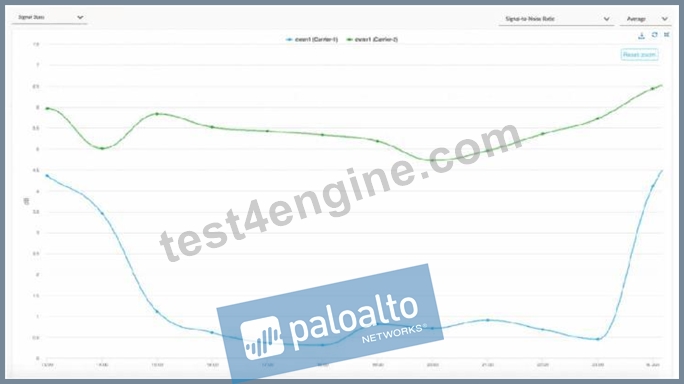
For the time duration shown in the graph, what are two inferences about the site's traffic that can be made?
(Choose two.)
- A. Using Carrier-2 as the WAN path may have experienced some performance degradation.
- B. Using Carrier-2 as the WAN path may have switched over to Carrier-1.
- C. Using Carrier-1 as the WAN path may have experienced some performance degradation.
- D. Using Carrier-1 as the WAN path may have switched over to Carrier-2.
Answer: C,D
Explanation:
The provided graph displays the Signal-to-Noise Ratio (SNR) for two cellular carriers, Carrier-1 (blue line) and Carrier-2 (green line), over a specific period. In cellular communications, SNR is a critical metric used to determine the quality of a wireless signal. A higher SNR indicates a cleaner, stronger signal, while a lower SNR indicates that the signal is being "drowned out" by background noise or interference, which directly correlates to performance degradation, packet loss, and lower throughput.
Looking at the graph, Carrier-1 experiences a significant and sustained drop in SNR, falling from roughly
4.5 dB to nearly 0.5 dB for the majority of the time duration. This drastic reduction in signal quality strongly suggests that Carrier-1 may have experienced performance degradation (Option A). During this dip, the link quality would likely fall below the configured thresholds for business-critical application traffic.
Because Prisma SD-WAN is an application-defined fabric that continuously monitors path health, the ION device would detect this degradation on Carrier-1. If Carrier-2 maintains a significantly higher and more stable SNR (as shown by the green line remaining between 4.5 dB and 6.5 dB), the ION device's Path Selection engine would automatically steer traffic away from the degraded link. Consequently, it is highly probable that Carrier-1 traffic switched over to Carrier-2 (Option D) to maintain the application SLA. This automated failover is a core strength of the Prisma SD-WAN architecture, ensuring that the best available path is utilized based on real-time link statistics rather than simple "up/down" states.
NEW QUESTION # 37
......
BEST Verified Palo Alto Networks SD-WAN-Engineer Exam Questions (2026) : https://troytec.test4engine.com/SD-WAN-Engineer-real-exam-questions.html