


[Jul 28, 2026] Free CompTIA 220-1201 Exam Questions and Answer
Verified 220-1201 dumps Q&As Latest 220-1201 Download
NEW QUESTION # 348
Which of the following wireless technologies has the most range but is susceptible to more interference?
- A. Infrared
- B. NFC
- C. Wi-Fi 5
- D. Bluetooth
Answer: C
Explanation:
Wi-Fi 5 operates on the 2.4GHz and 5GHz bands, providing significantly greater range than short-range technologies like NFC, Bluetooth, and infrared. However, especially on the 2.4GHz band, it is more susceptible to interference from other devices and environmental factors.
NEW QUESTION # 349
Which of the following is a benefit of using a VLAN?
- A. It enables secure network segmentation.
- B. It increases network address space.
- C. It minimizes collision domains.
- D. It provides private access to cloud resources.
Answer: A
Explanation:
A VLAN (Virtual Local Area Network) segments a physical network into separate logical networks, enhancing security by isolating traffic.
NEW QUESTION # 350
A technician is installing a new high-end graphics card that uses a 12VHPWR connector. Which of the following is the maximum wattage supported by this power connector?
- A. 600W
- B. 700W
- C. 400W
- D. MOW
Answer: A
Explanation:
The 12VHPWR connector can supply up to 600 watts of power, designed for high-end graphics cards.
Why Not A (400W): This is less than the connector's maximum capability.
Why Not B (MOW): This is an invalid option.
Why Not D (700W): The maximum supported power is 600W.
CompTIA A+ Exam Reference: Core 1 (220-1201), Section 3.4, power supply and connectors.
NEW QUESTION # 351
Which of the following could a user employ to maximize module bandwidth when selecting memory for a high-end gaming computer?
- A. Physical module size
- B. Error correction
- C. Channel configuration
- D. RAM voltage
Answer: C
Explanation:
Channel configuration(e.g.,dual-channel,quad-channel) determines how memory modules communicate with the memory controller. Usingmatched pairs in dual- or quad-channel setupscan significantlyincrease memory bandwidth, improving performance - especially for gaming and video-intensive tasks.
Option A (Error correction):ECC RAM is used in servers for reliability, not performance or gaming.
Option B (RAM voltage):Affects compatibility and overclocking but not bandwidth.
Option D (Physical size):Refers to module form factor (e.g., DIMM, SO-DIMM) and does not impact bandwidth.
CompTIA A+ Core 1 Exam Objective Reference:
Objective 3.2: Given a scenario, install RAM types.
NEW QUESTION # 352
A technician replaces a laptop's failed motherboard. During validation testing, the wireless is slow and shows a weak signal. Which of the following should the technician do first to verify the source of the issue?
- A. Reseat antenna connections
- B. Contact the manufacturer
- C. Restart the access point
- D. Install a new wireless adapter
Answer: A
Explanation:
Comprehensive and Detailed
Laptop Wi-Fi antennas run through the display bezel and connect via small coaxial clips. After motherboard replacement, these are often not fully seated, causing weak or unstable Wi-Fi.
CompTIA Concepts:
Laptop hardware troubleshooting
Antenna connector checks after repair
WLAN performance issues caused by antenna misalignment
NEW QUESTION # 353
Which of the following types of RAM would most likely be used in a server?
- A. ECC
- B. Unbuffered
- C. DDR3
- D. SODIMM
Answer: A
Explanation:
ECC (Error-Correcting Code) RAM is commonly used in servers because it can detect and correct memory errors, providing greater stability and reliability for mission-critical environments.
From CompTIA A+ 220-1101 Official Study Guide, Objective 3.2 - Types of RAM:
"Servers often require ECC memory, which can detect and correct single-bit errors, preventing data corruption and increasing system reliability." Verified Source:
* CompTIA A+ Core 1 (220-1101) Official Study Guide, Chapter 3: Memory Technologies
* CompTIA Exam Objectives 220-1101, Domain 3.2
NEW QUESTION # 354
A technician receives a tablet that looks like it has a bulge inside. The bulge is pushing the screen away from the backplate. The tablet still turns on when it is plugged in, but the screen looks damaged and turns off when unplugged. Which of the following is the most likely cause of this issue?
- A. Damaged charge port
- B. Broken screen
- C. Swollen battery
- D. Malfunctioning power supply
Answer: C
Explanation:
The most likely cause is a swollen battery, which occurs when the battery's internal components break down, causing a buildup of gas. This results in:
Physical Symptoms: The battery bulges, pushing the screen away.
Operational Symptoms: The device may still power on when connected to a charger but fails to hold a charge due to battery degradation.
Option A (Malfunctioning power supply): Incorrect. Power supply issues affect charging but do not cause physical bulging.
Option B (Damaged charge port): Incorrect. A damaged port can prevent charging but does not explain the bulge.
Option D (Broken screen): Incorrect. A damaged screen does not cause the device to bulge; it is likely a secondary effect of the swollen battery.
Safety Note: A swollen battery poses a risk of fire or explosion and should be replaced immediately following proper disposal procedures.
References:
CompTIA A+ Core 1 Objectives: 5.5 (Troubleshooting common issues with mobile devices)
NEW QUESTION # 355
A technician receives a tablet that looks like it has a bulge inside. The bulge is pushing the screen away from the backplate. The tablet still turns on when it is plugged in, but the screen looks damaged and turns off when unplugged. Which of the following is the most likely cause of this issue?
- A. Damaged charge port
- B. Broken screen
- C. Swollen battery
- D. Malfunctioning power supply
Answer: C
Explanation:
The most likely cause is a swollen battery, which occurs when the battery's internal components break down, causing a buildup of gas. This results in:
Physical Symptoms: The battery bulges, pushing the screen away.
Operational Symptoms: The device may still power on when connected to a charger but fails to hold a charge due to battery degradation.
Option A (Malfunctioning power supply): Incorrect. Power supply issues affect charging but do not cause physical bulging.
Option B (Damaged charge port): Incorrect. A damaged port can prevent charging but does not explain the bulge.
Option D (Broken screen): Incorrect. A damaged screen does not cause the device to bulge; it is likely a secondary effect of the swollen battery.
Safety Note: A swollen battery poses a risk of fire or explosion and should be replaced immediately following proper disposal procedures.
Reference:
CompTIA A+ Core 1 Objectives: 5.5 (Troubleshooting common issues with mobile devices)
NEW QUESTION # 356
A user joins a conference call with a Bluetooth headset. Which of the following has the user created?
- A. MAN
- B. WAN
- C. PAN
- D. SAN
Answer: C
Explanation:
B . PAN (Personal Area Network):
A PAN is a network established between devices in close proximity, such as between a smartphone and a Bluetooth headset.
Bluetooth technology is specifically designed for short-range communication, making it a type of PAN.
Incorrect Options:
A . MAN (Metropolitan Area Network): A MAN covers a city or metropolitan area and is not relevant to Bluetooth connections.
C . SAN (Storage Area Network): A SAN is used for large-scale data storage, unrelated to Bluetooth connections.
D . WAN (Wide Area Network): A WAN spans large geographical areas (e.g., the internet) and is not relevant to this scenario.
Key Takeaway: Bluetooth connections, such as those between a headset and a device, create a Personal Area Network (PAN).
NEW QUESTION # 357
Which RAID type offers double parity?
- A. RAID 5
- B. RAID 1
- C. RAID 6
- D. RAID 0
Answer: C
Explanation:
CompTIA A+ teaches that RAID 6 is the RAID level that uses double parity, allowing the array to survive the failure of two drives simultaneously. RAID 6 stripes data across all disks like RAID 5 but stores two independent sets of parity information, making it far more fault-tolerant.
RAID 0 has no parity and provides only performance. RAID 1 mirrors data but uses no parity. RAID 5 uses single parity and can tolerate only one disk failure. Because the question explicitly asks for double parity, only RAID 6 is correct.
NEW QUESTION # 358
Which of the following is an advantage of using VDI?
- A. Less manual configuration is needed for each workstation.
- B. Authentication is not required on a domain.
- C. A virus is automatically contained locally.
- D. Licensing costs are minimized.
Answer: A
Explanation:
Virtual Desktop Infrastructure (VDI)hosts desktop environments on centralized servers. Thisallowsrapid deployment and consistent configurationacross multiple users, minimizing manual setup and easing IT management.
Option A:VDI still uses standard authentication methods.
Option B:Licensing can actually be more expensive due to virtualization software and backend servers.
Option D:VDI centralizes the desktop environment viruses would affect the virtual session, not be "contained locally." CompTIA A+ Core 1 Exam Objective Reference:
Objective 4.1: Compare and contrast cloud computing concepts.
NEW QUESTION # 359
A user tries to connect a monitor to a laptop to have an additional screen for work, but both screens show the same content. Which of the following should the user do to resolve the issue?
- A. Go to the Display settings and configure the external monitor as extended.
- B. Configure the Windows tiling feature to display multiple windows.
- C. Purchase a docking station to connect both the laptop and the monitor.
- D. Use the Add New Hardware assistant to add the monitor and set up the required settings.
Answer: A
Explanation:
By default, Windows often mirrors (duplicates) the laptop display. In Display settings, you can change the multiple-display option from "Duplicate" to "Extend", enabling the second monitor to act as additional workspace rather than showing the same content.
NEW QUESTION # 360
A technician purchases a device that connects directly to the rear of a laptop and provides a one-to-one match for every peripheral connection. Which of the following best describes this device?
- A. KVM switch
- B. USB hub
- C. Docking station
- D. Port replicator
Answer: D
Explanation:
A device that connects directly to a laptop and provides a one-to-one duplication of the laptop's existing ports is known as a port replicator. According to CompTIA Core 1 (220-1201) mobile device and laptop accessories objectives, a port replicator extends the available connections by mirroring the laptop's built-in ports, such as USB, HDMI, Ethernet, and audio. This allows users to quickly connect peripherals like monitors, keyboards, mice, and network cables without plugging each device in individually.
Port replicators are typically passive devices and do not add new functionality beyond duplicating existing ports. They are commonly used in office environments where users frequently dock and undock laptops.
A docking station, by contrast, often provides additional or enhanced functionality, such as extra video outputs, higher-power charging, expansion slots, or proprietary connectors. A USB hub only expands USB connectivity and does not replicate all peripheral connections. A KVM switch is used to control multiple computers with a single keyboard, video display, and mouse, which is unrelated to laptop port expansion.
CompTIA distinguishes port replicators as simple port-duplication devices, making them the correct answer in this scenario.
References:CompTIA A+ Core 1 (220-1201) Official Study Guide - Mobile Device Accessories and Laptop Hardware
NEW QUESTION # 361
A customer has a basic unmanaged switch and wants to install a wireless access point in the attic. Which of the following should a technician recommend to make the installation as simple as possible?
- A. Use a PoE injector inline with the device.
- B. Install a patch panel in the stairwell.
- C. Install a new electrical outlet.
- D. Mount the antenna on the roof.
Answer: A
Explanation:
A Power over Ethernet injector is the simplest solution because the unmanaged switch does not provide PoE.
The injector is installed inline between the switch and the wireless access point. It adds electrical power to the Ethernet connection while allowing network data to travel over the same cable. This eliminates the need to install a separate electrical outlet in the attic, reducing installation complexity and cost. A patch panel organizes and terminates network cabling but does not provide power. Mounting an antenna on the roof would not solve the access point's power requirement and could create additional environmental and cabling concerns. Installing an electrical outlet would work, but it requires electrical work and is less convenient. A PoE injector is specifically designed to power devices such as access points and IP cameras when the existing switch lacks PoE capability.
NEW QUESTION # 362
A user's smartphone frequently disconnects from Wi-Fi networks, particularly in crowded areas like airports and coffee shops. The user also notices that their device shows a lower Wi-Fi signal strength compared to other devices in the same location. Which of the following is likely contributing to the smartphone's Wi-Fi connectivity issues?
- A. The smartphone may be experiencing interference from nearby devices.
- B. The smartphone's power settings may be affecting performance.
- C. The smartphone's antenna may be malfunctioning.
- D. The smartphone may have an outdated Wi-Fi standard.
Answer: C
Explanation:
The symptoms clearly point to a hardware-level signal degradation issue, which is most commonly caused by a malfunctioning or damaged Wi-Fi antenna in the smartphone. CompTIA A+ mobile device troubleshooting emphasizes comparing the affected device's signal strength with other nearby devices. In this case, other devices in the same location have stronger Wi-Fi signals, meaning the network itself is functioning normally. The consistent low signal across multiple networks strongly suggests antenna failure.
Modern smartphones use internal antenna assemblies located along the frame or behind the back cover. If the antenna becomes loose, damaged, or obstructed, the device may show weak or unstable Wi-Fi connectivity, especially in crowded environments where strong, stable reception is required to maintain a connection.
Option B (outdated Wi-Fi standard) would limit speed but not cause significant signal weakness compared to surrounding devices. Option C (interference) affects all devices in an area similarly-not just one device. Option D (power settings) may reduce background activity or scanning frequency, but it does not cause consistently low signal strength.
Therefore, the most likely cause is a malfunctioning Wi-Fi antenna inside the smartphone.
NEW QUESTION # 363
A human resources manager printed a sensitive employee termination announcement and forgot to retrieve the document from the printer. Which of the following is a way to avoid this situation?
- A. Printer share
- B. Wireless encryption
- C. Duplex
- D. Badging
Answer: D
Explanation:
Badging requires the user to authenticate at the printer before the document is released, ensuring sensitive print jobs are not left unattended and are only retrieved by the intended individual.
NEW QUESTION # 364
Which of the following best describes the benefits of cloud computing in the context of business operations?
- A. It provides elasticity, allowing businesses to scale resources up or down easily.
- B. It removes the need for software licenses for on-premises deployments.
- C. It delivers on-premises data storage for sensitive information.
- D. It offers complete control over physical servers to the IT team.
Answer: A
Explanation:
Cloud computing provides elasticity, enabling businesses to dynamically scale resources based on demand, which improves efficiency and cost management.
NEW QUESTION # 365
An IP address is automatically assigned to a single workstation in an office, but the technician confirms the IP address is not in the lease pool. This workstation is having issues accessing the internet and internal file shares. Which of the following address types has been automatically assigned?
- A. DHCP
- B. Static
- C. Public IP
- D. APIPA
Answer: D
Explanation:
When a workstation automatically assigns itself an IP address that is not part of the DHCP lease pool, the system has most likely configured an APIPA (Automatic Private IP Addressing) address. According to CompTIA Core 1 (220-1201) networking fundamentals, APIPA addresses fall within the range 169.254.0.0
/16 and are assigned when a device cannot communicate with a DHCP server.
APIPA allows limited local network communication but does not provide access to the internet or network resources such as internal file shares that require routing or proper IP configuration. This explains why the workstation experiences connectivity issues.
A static IP address is manually configured and would not be automatically assigned. A DHCP address would come from the defined lease pool, which the technician has confirmed is not the case. A public IP address is assigned by an ISP and is not used directly on internal workstations.
CompTIA highlights APIPA as a key troubleshooting indicator of DHCP failure or network connectivity issues, making it the correct answer.
References:CompTIA A+ Core 1 (220-1201) Official Study Guide - IP Addressing, DHCP, and Troubleshooting
NEW QUESTION # 366
A user brings a laptop to work every morning, correctly seats it in the docking station and then opens the laptop to begin work with no issues After the user left the laptop at home during a two- week vacation the laptop is no longer working. Upon returning to the office, the user reports that the keyboard and display are no longer working. Which of the following should the technician ask the user to do first?
- A. Connect the laptop directly to the network.
- B. Ensure the docking station is plugged in.
- C. Press and release the laptop power button.
- D. Plug the laptop in and let it charge overnight
Answer: C
Explanation:
Reasoning: Many docking stations provide power and functionality only when the laptop is properly powered on. If the laptop was powered off (e.g., during the vacation), docking it will not automatically turn it on. The technician should first ensure the laptop is powered on by pressing the power button. This is a common troubleshooting step when laptops in docking stations appear non-functional.
NEW QUESTION # 367
A user reports that they cannot get their laptop to work with a video projector connected with an HDMI cable. The projector is turned on. The HDMI cable is securely connected on both ends, and the laptop displays properly on its own screen. The display mode is set to "Duplicate" on the laptop. Which of the following is most likely causing the issue?
- A. The projector does not support HDMI connections.
- B. The laptop display mode should be set to "Extend".
- C. An HDMI port on the projector failed.
- D. The input source is incorrect on the projector.
Answer: D
Explanation:
Comprehensive and Detailed Explanation
CompTIA troubleshooting procedures emphasize confirming input source settings on the external display device.
Even if the HDMI cable is connected properly:
The projector must be set to the correct input source (HDMI 1, HDMI 2, etc.).
If the source is incorrect, the laptop will not display, even though the laptop output is functioning normally.
Since the projector is powered on, and the laptop is already set to "Duplicate," and cables are good, the most likely cause is:
✔ The projector is set to the wrong input source.
This is a common real-world issue covered under "video and projector troubleshooting." Why the other answers are incorrect A . Projector may support HDMI; this is not the "most likely." B . "Extend" is not required - "Duplicate" works for projectors.
C . A failed HDMI port is possible but not the most likely scenario.
NEW QUESTION # 368
An end user wants to share their cellular internet connection with their laptop. Which of the following technologies should they use?
- A. Ethernet
- B. NFC
- C. Hotspot
- D. Bluetooth
Answer: C
Explanation:
To share a phone's cellular data connection with a laptop, the user should use a hotspot, also known as mobile hotspot or Wi-Fi tethering. In CompTIA A+ Core 1 terms, this feature allows a smartphone to act like a small wireless router: it takes the phone's mobile data (4G/5G) connection and rebroadcasts it over Wi-Fi so another device (the laptop) can join the wireless network using an SSID and password. This is the most common and straightforward method because laptops universally support Wi-Fi and the connection typically provides better throughput than other tethering methods. Hotspot/tethering settings also commonly allow configuration of security (WPA2/WPA3) and can limit connected devices to reduce unauthorized access and manage data usage.
Bluetooth (option B) can support tethering on some devices, but it is slower, more limited, and not the primary expected answer when the goal is simply sharing cellular internet with a laptop. NFC (option C) is mainly used for close-range pairing or payments and does not provide an internet sharing link by itself.
Ethernet (option D) would require wired adapters and is not the standard method for cellular sharing.
Therefore, Hotspot is the best answer.
NEW QUESTION # 369
A technician is diagnosing several device issues reported by employees.
INSTRUCTIONS
Click on each device to review the issue. Then select the appropriate issue and solution from the drop-down menu. Each option may be used more than once.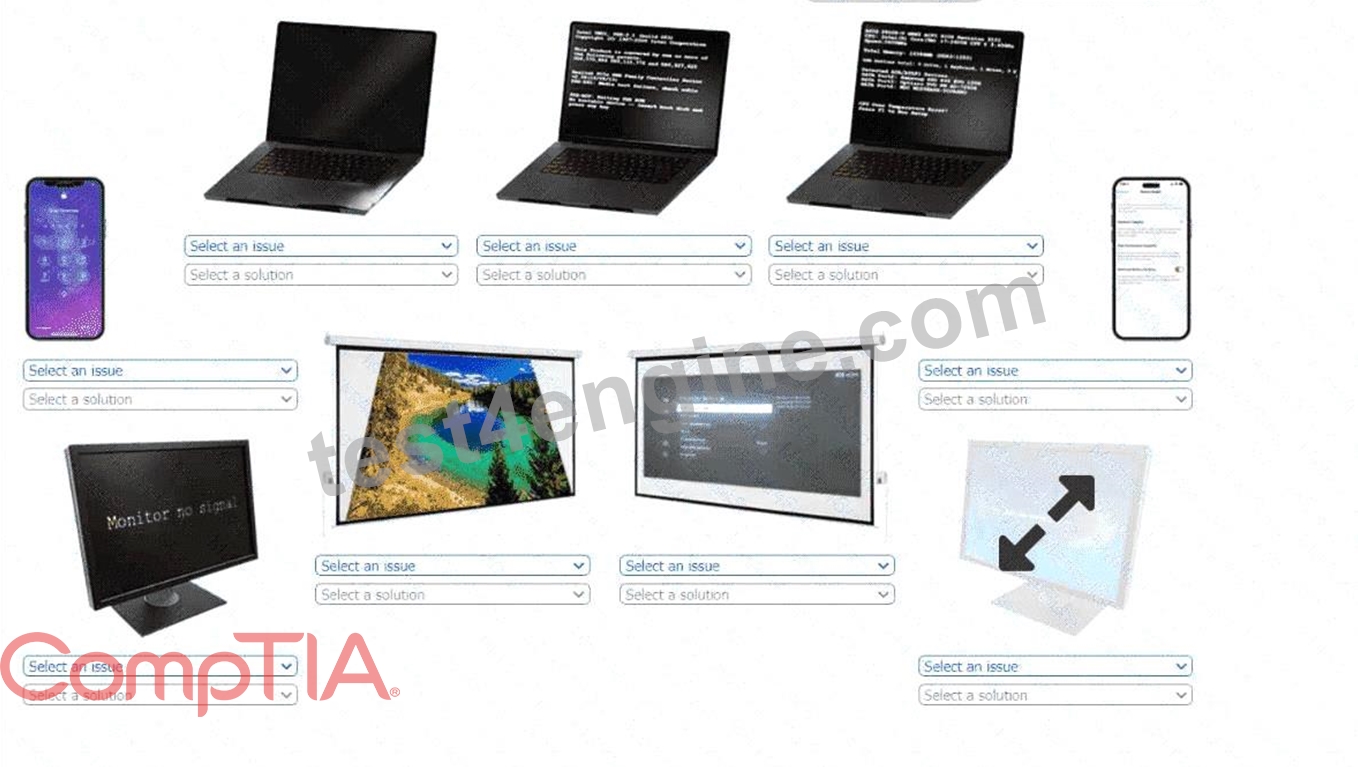
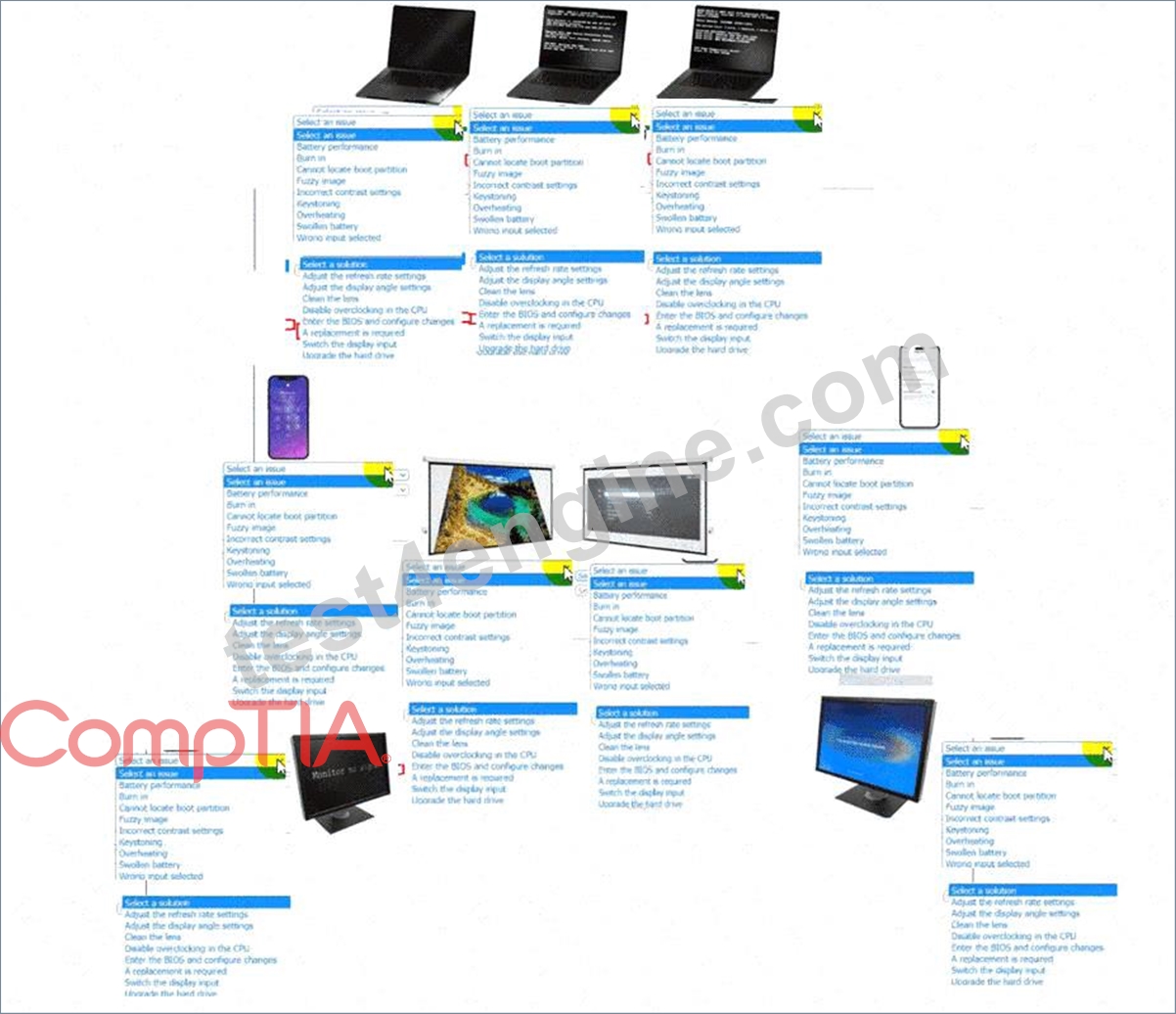
Answer:
Explanation: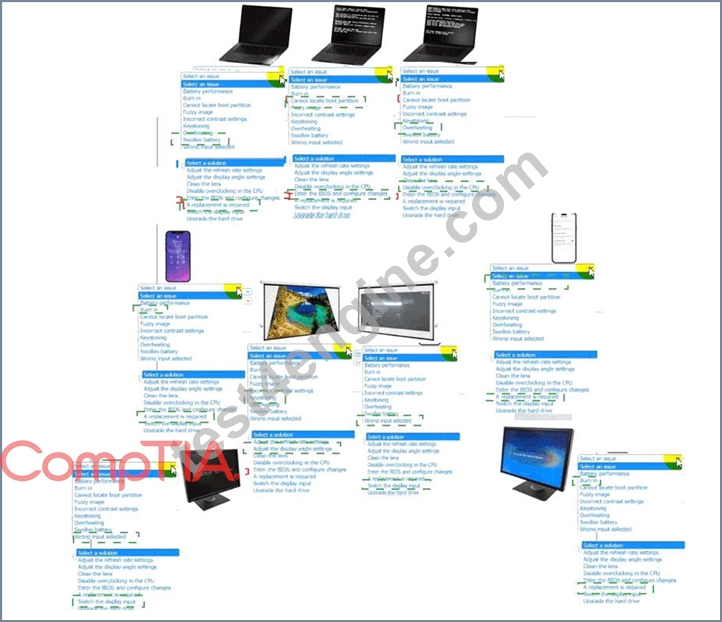
Explanation:
A screenshot of a computer AI-generated content may be incorrect.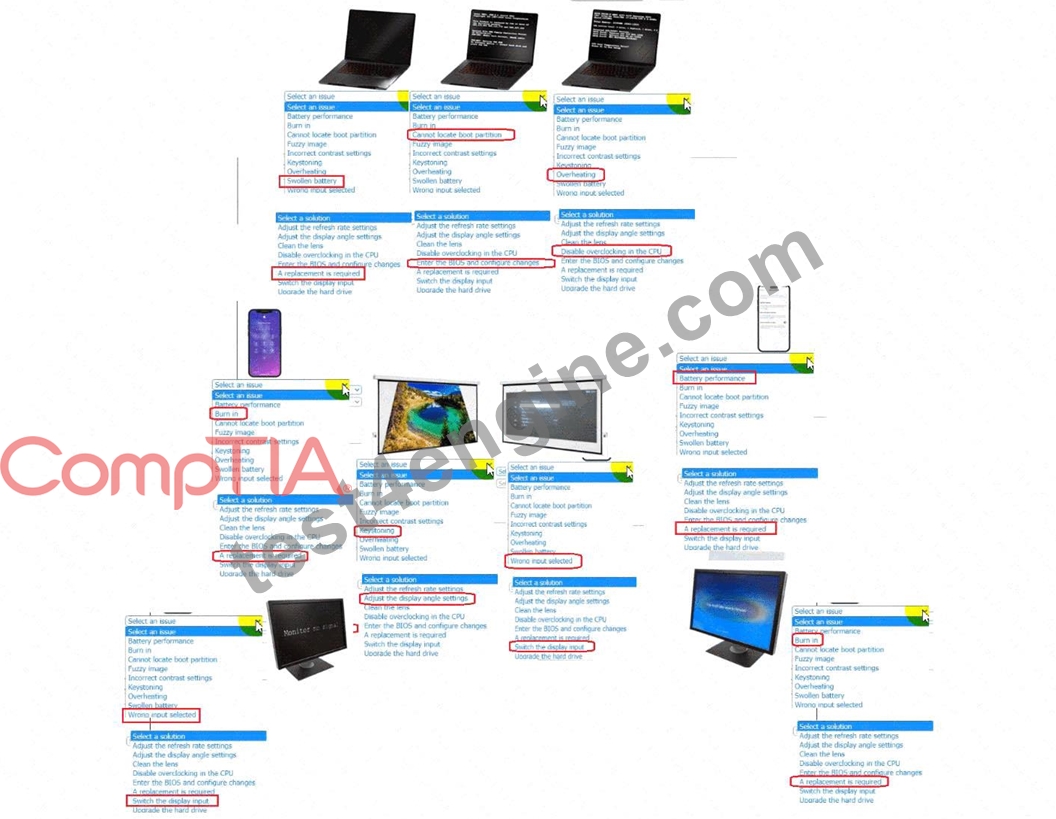
NEW QUESTION # 370
A company requires a storage solution that combines performance and redundancy for a main database server with high levels of read/write operations. Which of the following storage configurations best meets these requirements?
- A. RAID 5
- B. RAID 6
- C. RAID 10
- D. RAID 0
Answer: C
Explanation:
RAID 10 combines striping and mirroring, delivering high performance for intensive read/write operations while maintaining redundancy through mirrored data, making it ideal for database workloads.
NEW QUESTION # 371
A software developer wants to test a new application in an environment that limits access to the OS. Which of the following should the developer implement?
- A. Type 2 hypervisor
- B. VDI
- C. Container
- D. Quarantined PC
Answer: C
Explanation:
A container is the ideal environment for software testing when access to the underlying operating system must be restricted. CompTIA A+ explains that containers isolate applications from the host OS by packaging the app and all its dependencies into a controlled environment. This prevents the application from modifying or interfering with the host system and ensures predictable, consistent behavior across environments.
Unlike virtual machines, containers do not include a full OS installation; they share the host OS kernel but run in isolated user-space environments. This makes them lightweight, fast to deploy, and secure-perfect for developers testing new or potentially unstable applications.
A Type 2 hypervisor hosts full virtual machines but does not inherently limit OS access. A VDI provides remote desktops but is not designed for controlled application testing. A quarantined PC is used for isolating infected or suspicious systems, not structured development testing.
Thus, containers provide the controlled, restricted environment required.
NEW QUESTION # 372
......
Use Real Dumps - 100% Free 220-1201 Exam Dumps: https://troytec.test4engine.com/220-1201-real-exam-questions.html